ElkNut
- 4.3
- Rating
- 10.00K
- Installs
- Free
- Price

 Analysis by App-foxy
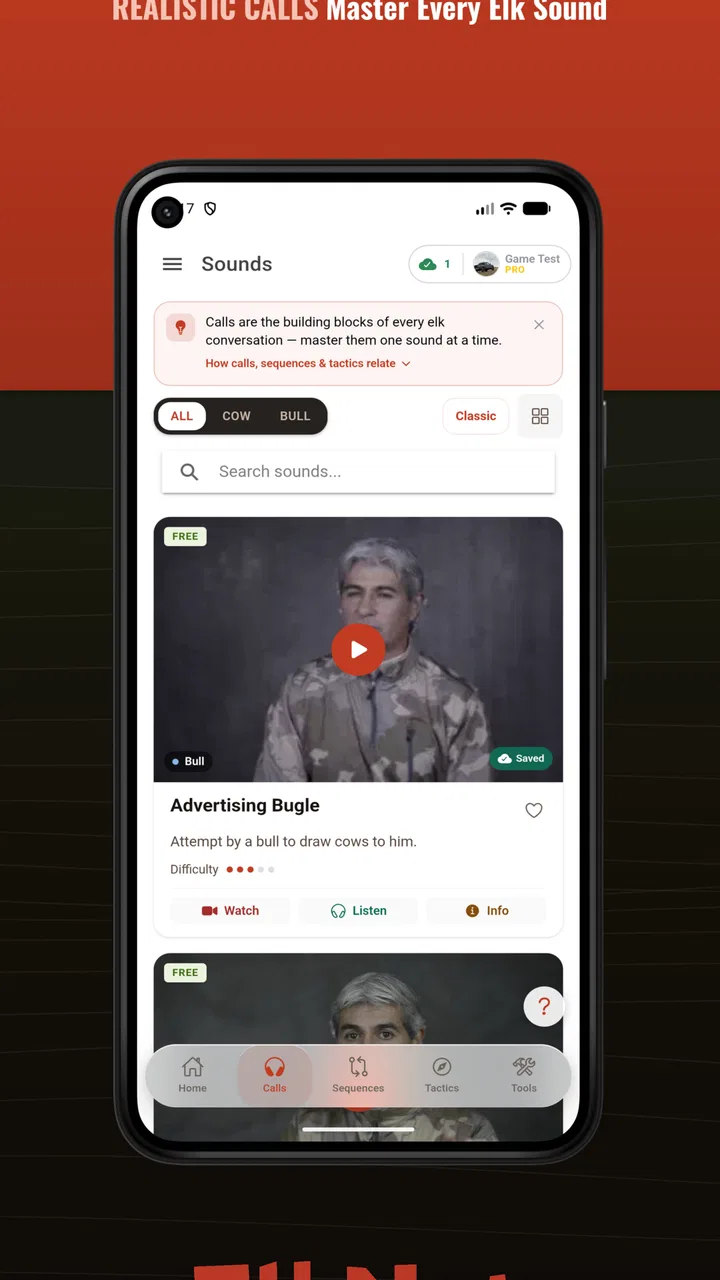
ElkNut is the kind of sports app I would open before a hunt rather than browse casually at home. It focuses on elk calls, calling sequences, tactics, hunt tools, AI call coaching, and offline use, so its value depends on whether you want a practical field companion instead of a broad outdoor community or a general weather app. I found the idea appealing because elk calling is easy to overcomplicate: there are sounds to learn, timing decisions to make, and plenty of moments when a quick reference is more useful than a long article.
Developed by Got Game Technologies, this free sports app has built a solid, if still relatively compact, audience. It carries a 4.3 average from over 200 ratings and has passed 10,000 installs. Those figures suggest genuine interest without making me treat popularity as proof that every hunting situation will suit it. The content rating is Everyone, while the practical audience is clearly hunters who want help preparing for and managing elk calls.
My overall impression is positive but specific: ElkNut is most useful when you already intend to hunt and need organized guidance in your pocket. It is less convincing as a complete replacement for experience, local knowledge, legal preparation, or careful observation of the animals around you. The app can support decisions, but it cannot make those decisions responsibly on your behalf.
You May Also Like

 AccuWeather: Weather Radar
AccuWeather Review: A Quick, Clear Forecast for Everyday Decisions
For everyday plans, the best forecast is the one you can understand quickly. AccuWeather makes rain timing, radar, and local conditions easy to act on, with a few trade-offs.

 Hill Climb Racing
Why Hill Climb Racing Still Turns Crashes Into One More Run
A tiny car, a bumpy hill and one more upgrade: Hill Climb Racing keeps resurfacing because its simple chaos makes every near-miss feel personal.

 AliExpress - Shopping App
AliExpress Makes Global Shopping Feel Personal, but Shoppers Bear the Risk
AliExpress turns a global marketplace into a pocket-sized discovery engine. Its reach is useful, its shopping loop compelling, and its trade-offs easy to miss.

 Lords Mobile: Kingdom Wars
Lords Mobile Is a Kingdom-Building Routine, Not a Quick Match
A case-by-case verdict on the building, battles, device demands, and social commitments that make Lords Mobile rewarding for some players and exhausting for others.

 PDF Scanner app - TapScanner
TapScanner Makes Paperwork Easier to Capture, Check, and Share
TapScanner makes scanning with a phone feel less like a rescue operation and more like a dependable step in getting work done. Its capture tools are useful, though not flawless.

 Block Blast!
 Shows How Much a Puzzle Game Can Leave Out
A quiet grid game shows why puzzle players increasingly value instant clarity, repeatable skill and low-pressure play—and where the genre still needs to catch up.
More From Our News Desk
View All News


What makes ElkNut useful before and during a hunt
I find ElkNut most useful when I give it a job before the trip: choose a small set of calls to practise, then decide which material I may need away from reception. That simple preparation makes field use calmer and keeps the phone from becoming a distraction. Next, I’d look at the settings that can make that routine more dependable.
A focused approach to elk calling
The strongest part of the app is its narrow focus. Instead of treating hunting as one large subject, it concentrates on the communication side of elk hunting. That makes the experience easier to approach if your immediate question is practical: which call should I study, how might a sequence be arranged, or how can I rehearse before heading out?
I like this focus because a general search often produces scattered advice. You may find a video explaining one sound, a forum discussing another, and a separate article describing tactics. ElkNut brings the subject into one hunting-oriented tool. That does not automatically make every recommendation correct for every terrain or season, but it gives me a more coherent place to prepare.
The app is also more useful when treated as a reference than as entertainment. I would spend time with it at home, identify the calls I struggle to recognize, and then use the offline tools when traveling into an area with weak reception. That workflow is more realistic than expecting to learn everything while standing in the woods.
AI coaching needs the right expectations
The AI call coaching is an interesting feature because it changes the app from a passive library into something closer to a practice aid. A recording or explanation can tell me what a call should sound like, but coaching encourages me to listen to my own attempt and look for improvement. For a beginner, that feedback loop can make practice feel more purposeful.
At the same time, I would not treat AI coaching as a final judge of hunting ability. Animal behavior, wind, distance, echo, microphone quality, and background noise all affect what a recording represents. A clean practice environment is very different from a cold, windy hillside. The sensible use is to improve consistency and confidence before the hunt, then rely on field judgment when conditions change.
A useful routine is to practice one call at a time instead of trying to master every option in one sitting. I would record a short attempt, listen carefully, and note whether the rhythm and intensity feel controlled. Repeating that process over several sessions is likely to be more valuable than rushing through a long list of sounds. The app’s coaching is best viewed as structured repetition, not a guarantee of a response.
Sequences are more valuable than isolated sounds
One non-obvious strength is the attention to sequences. Beginners often focus on producing a recognizable sound and overlook what happens before and after it. A sequence gives the call a place in a broader plan: when to begin, how to vary the approach, and when silence may be the better choice.
I would use this part of the app to prepare several simple plans rather than memorize one fixed routine. For example, I might study a cautious sequence for a quiet morning and a more assertive approach for a situation where elk activity is already evident. The point is not to press buttons mechanically. It is to understand why a sequence changes as the situation develops.
This is also where ElkNut differs from a basic collection of audio clips. A clip can help with recognition, but a sequence encourages timing and restraint. That distinction matters because calling too frequently can become a habit, especially when nerves take over. Having a prepared structure can help me pause, observe, and avoid filling every quiet moment with sound.
Offline access is a field feature, not a luxury
The offline mode is one of the most practical inclusions. Hunting locations are not chosen for dependable mobile service, and a tool that only works when connected is of limited use at the exact time I need it. Being able to prepare material in advance makes the app more suitable for remote trips, travel days, and last-minute review at a trailhead.
I would still prepare before leaving rather than assume that every part of the app will be instantly available offline. The safest workflow is to open the relevant calls, coaching material, and hunt tools while connected, then confirm that the sections I expect to use remain accessible. This is a small habit, but it prevents a frustrating discovery after reception disappears.
Offline access also changes how I think about battery use. I would rather review a sequence before starting and keep the phone quiet during the hunt than repeatedly search through content in the field. The app can reduce dependence on printed notes, but it does not remove the need to manage battery, weather protection, and a backup plan.
Hunt tools help organize preparation
The hunt tools are useful because they move the app beyond calling practice. I see them as a way to gather the small decisions that are easy to forget: what I want to work on, which sequence fits my plan, and what I should review before heading out. Their value is highest when I use them as preparation aids rather than as a substitute for maps, regulations, navigation equipment, or local scouting.
A realistic scenario would be an early departure after several days of preparation. The night before, I could use ElkNut to rehearse a small set of calls, review a sequence, and make sure the offline material is ready. In the morning, I would use the app briefly as a reminder, not stare at the screen while moving through unfamiliar terrain. That keeps the technology in its proper role: supporting attention rather than competing with it.
Trust depends on visible choices
Because this app is intended for outdoor use, I pay attention to trust in a practical way. A hunting tool may be used in remote places, during stressful moments, and alongside sensitive trip planning. I want clear control over what I do inside the app, especially when an account, purchases, or device access becomes part of the experience.
ElkNut is free to download, with in-app purchases priced at $14.99 per item. That makes it important to distinguish between trying the app and committing to optional paid content. I would explore the free experience first, identify which tools actually fit my hunting style, and only then decide whether an individual purchase adds enough value. The price is not automatically unreasonable, but it deserves a deliberate decision rather than an impulsive tap in the field.
I also prefer making purchase decisions while connected and calm, not when I am tired, cold, or trying to solve a problem quickly. Checking the purchase screen carefully before confirming is a simple form of user control. It helps me understand what I am choosing and prevents the app from becoming more expensive than expected through rushed decisions.
On the privacy side, I judge the experience by the controls and explanations I can actually see rather than by assumptions. I would review the app’s permission prompts, account settings, and any privacy information presented on the device or in the store before entering personal details. If a feature asks for access that does not feel necessary for my intended use, I would pause and decide whether to deny it or skip that feature. That approach is more reliable than assuming every hunting app handles information in the same way.
Location deserves particular care in this category. A hunter may be thinking about private land, access routes, or a remote campsite, so I would not grant location access casually. If ElkNut works for my purpose without it, I would keep that permission off. If a tool genuinely needs location, I would choose the narrowest available option and revisit the setting later. The important point is that the user should make that choice consciously.
The same caution applies to microphone access for call coaching. A coaching feature may reasonably need audio input, but I would enable it when practicing and disable it when I am finished if the operating system allows that control. I would also avoid recording conversations, other people, or sensitive surroundings by accident. This is not a criticism of the concept; it is a sensible habit whenever an app interacts with a phone’s microphone.
Account control and everyday usability
Before relying on any outdoor app, I want to know how much of the experience is tied to an account. If I can use the core material without creating a profile, that reduces friction and limits the amount of information I need to provide. If an account is necessary for a particular feature, I would use a unique password and avoid entering more personal information than the service requires.
I would also check how the app behaves after an update or device change. The current version is 4.0.8, and it supports devices running Android 7.0 or later. That broad compatibility is helpful for people who keep an older phone as a dedicated field device. Still, I would test the app on the actual phone I plan to carry, particularly if it has limited storage or an older battery.
Testing matters because offline tools, audio coaching, and purchased material can behave differently from a quick first launch. I would install the app at home, open the sections I expect to use, practice with the microphone, and then briefly test it with connectivity disabled. This takes little time and reveals whether my planned workflow is dependable before the trip begins.
Where it beats the usual alternatives
The usual alternatives are a mix of online videos, printed hunting guides, audio files, browser searches, and advice from experienced hunters. Each has a place. Videos can show technique and context, printed guides work without batteries, and personal instruction can explain decisions that no app understands. ElkNut’s advantage is convenience: it combines calling material, sequences, coaching, and field-oriented tools in one focused app.
Compared with random online clips, the app should be easier to use as a repeatable study routine. Compared with a printed guide, it offers interactive practice and coaching. Compared with a single audio file, it provides more context around how calls may be arranged. Those are meaningful differences for someone who wants to practice actively rather than simply listen.
However, the alternatives remain better in several situations. A printed guide is preferable when I want a battery-free reference. A knowledgeable mentor is better when I need feedback on posture, timing, terrain, or ethical decisions. Official regulations and land-management information should come from the relevant authorities, not from a calling app. ElkNut can sit beside those resources, but it should not replace them.
Who should use it, and who should skip it
I would recommend ElkNut to a beginner who wants a structured introduction to elk calls, a hunter who wants to rehearse sequences, or an experienced user who values having offline references in one place. It is also a sensible choice for someone who learns by doing. The AI coaching gives practice more direction than simply replaying an audio example.
I would be more cautious if your main need is navigation, detailed trip logistics, legal information, or a complete hunting education. This app’s focus is narrower. Someone who already has a trusted calling system and never practices with a phone may gain little from it. Likewise, a user who dislikes optional purchases should explore the free material carefully before deciding whether the paid items are worthwhile.
It may also be the wrong choice for anyone expecting an automated answer to every field situation. ElkNut can suggest ways to study calls and sequences, but it cannot read the wind, judge animal behavior, understand your exact surroundings, or account for local restrictions. The more experience you have, the more likely you are to use it as one input among several rather than follow it blindly.
My practical way of using it
If I were preparing for a trip, I would begin several days ahead. First, I would explore the available calling material and identify the sounds I can produce comfortably. Next, I would use the coaching feature in short sessions, listening for consistency instead of chasing volume. Then I would review sequences and choose a small number that match the situations I realistically expect to encounter.
After that, I would open the hunt tools and turn the plan into a short checklist. I would confirm that the content is available offline, review permissions, and decide whether any optional purchase is genuinely useful. On the day itself, I would keep phone use brief and avoid letting the screen distract me from terrain, safety, and observation.
This workflow reveals one of the app’s main trade-offs. It can make preparation more organized, but it rewards users who prepare before the hunt. If you download it moments before leaving and expect instant expertise, the experience will feel less impressive. If you use it as a practice companion over time, its focused design makes more sense.
Final assessment
ElkNut is strongest as a focused, offline-friendly elk-calling coach, not as an all-purpose hunting system. I appreciate the combination of call study, sequences, AI-assisted practice, and field tools because those pieces address different stages of preparation. The app feels most valuable when I use it to build a repeatable routine and then put the phone away when real observation matters.
Its free entry point makes it easy to test, while the $14.99 in-app items mean I would inspect the available choices before spending anything. I would also keep permissions, account details, microphone access, and any location setting under active control rather than granting access automatically. Those habits improve trust without requiring assumptions about what the app does behind the scenes.
With a 4.3 average and more than 10,000 installs, it has enough user interest to merit a serious look, but my recommendation rests more on fit than on those figures. If you want a compact tool for practicing elk calls and reviewing sequences away from reliable service, I think it is worth trying. If you need official rules, navigation, deep local expertise, or a replacement for time in the field, choose those resources first and use ElkNut only as a supporting reference.
For the right hunter, that is a useful and honest role. It helps turn uncertain practice into a clearer routine, gives offline access a real purpose, and leaves the important decisions with the person holding the phone.
FAQs for ElkNut
01What is ElkNut and what can I use it for?
ElkNut is an app designed to help users manage and organize information related to elk hunting, including planning, field references, and potentially useful hunting resources. Its value depends on the tools included in the current version and the region where you hunt. Before downloading, review the app’s description, supported locations, and available features to confirm that it matches your needs.
02Is ElkNut available for both Android and iOS devices?
Availability can vary depending on the platform, country, and version of the application. Check the official Google Play Store or Apple App Store listing before installing ElkNut. Pay attention to the required operating-system version, storage space, developer information, and recent update date. If the app is unavailable in your region, changing device settings may not be supported or recommended.
03Does ElkNut require an internet connection to work?
Some ElkNut features may require an internet connection, especially account access, map downloads, synchronization, content updates, or online hunting resources. Other functions might work offline once information has been saved to your device. If you plan to use it in remote areas with weak reception, test the relevant tools beforehand and download any available offline content before leaving home.
04Is ElkNut free to download, and are there in-app purchases?
The download price and available features may differ between Android and iOS. ElkNut may offer free access to basic tools while reserving advanced content or services for in-app purchases, subscriptions, or a premium version. Always read the store listing and purchase details carefully, including renewal terms, before paying. Also check whether deleting the app automatically cancels a subscription, since it usually does not.
05Is ElkNut accurate and suitable for making hunting decisions?
ElkNut can be a useful planning or reference tool, but it should not be treated as a replacement for official regulations, current maps, professional guidance, or personal judgment in the field. Hunting rules, seasons, licenses, boundaries, and safety requirements can change. Verify important information with the appropriate wildlife agency and use the app as a supplement rather than your only source.
Pros
- Simple interface makes browsing elk-related content quick and accessible.
- Useful for hunters planning trips
- seasons
- and equipment needs.
- Can help users organize information in one convenient mobile app.
- Relevant content may support both beginners and experienced elk hunters.
- Mobile access is convenient when researching outdoors or away from a computer.
Cons
- Content quality may vary depending on updates and regional coverage.
- Some features may require internet access while traveling outdoors.
- Information may not apply equally to every hunting area or local regulation.
- The app may feel limited for users seeking broader wildlife resources.
- Battery and data usage could increase during extended outdoor sessions.

ElkNut
Gallery